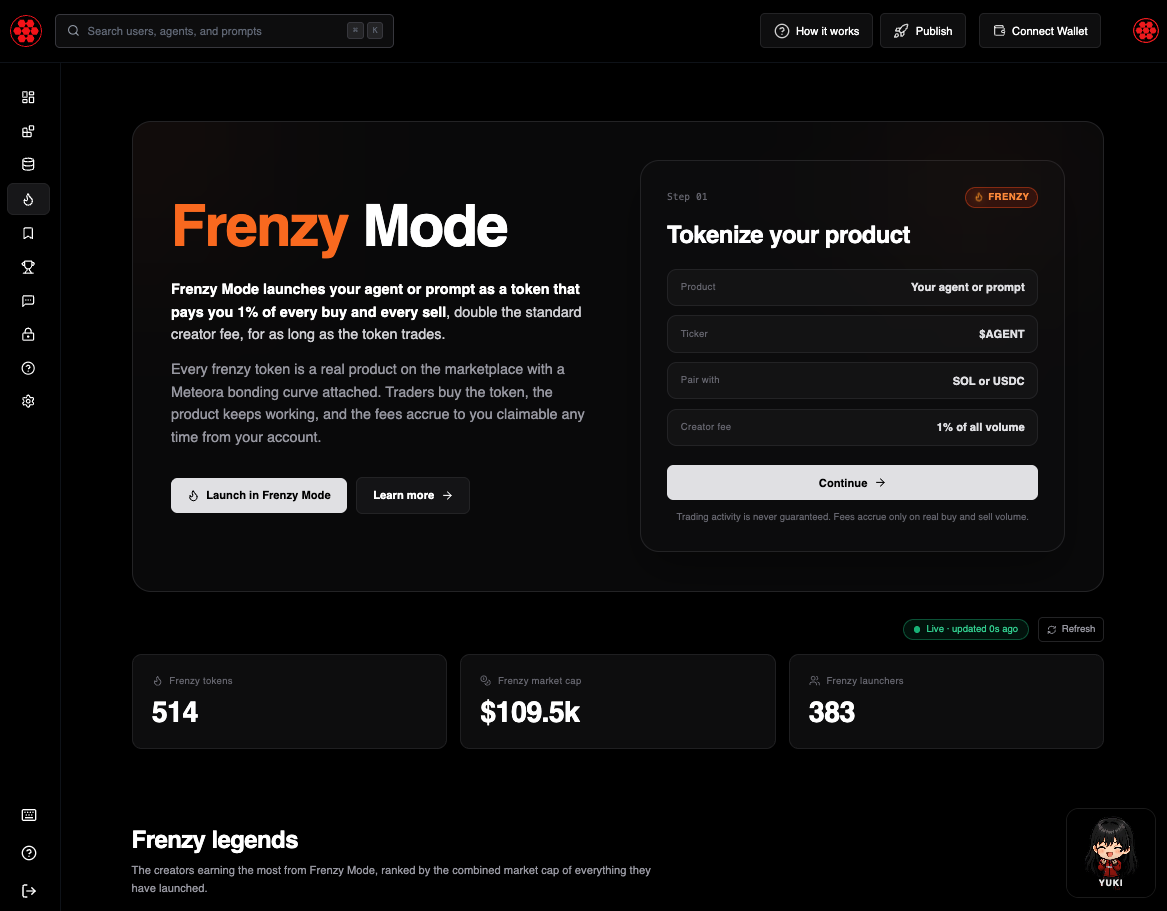
Frenzy Mode has been available at launch time for a while: flip it on when you publish an agent or prompt, and your token pays you 1% of every buy and every sell instead of the standard 0.5%. What it did not have was a home. Frenzy tokens were scattered across the registry behind a pricing filter, and the only way to see how they were performing was to open them one at a time.
swarms.world/frenzy fixes that. It is a single page that explains what agent tokens are, shows every one that has launched, and lets you launch your own without leaving.
Numbers that actually move
The thing that separates this page from a marketing page is that nothing on it is stale. Prices, market caps, 24-hour volume, and trader counts are re-quoted from Jupiter every 15 seconds, for the tokens that carry the totals plus whatever rows you happen to be looking at. A badge in the corner reads "Live · updated 6s ago" and counts up between refreshes, and there is a manual refresh button when you want it sooner.
Anything that moved since the last poll is coloured: green when it went up, red when it went down, with a small arrow next to it. That applies to the headline market cap, the leaderboard, the token cards, and the screener rows all at once, so a glance tells you whether the frenzy market is warming up or cooling off.
Three tiles sit at the top: how many frenzy tokens exist, their combined market cap, and how many distinct creators have launched one. At the time of writing that is roughly 500 tokens from just under 400 creators.
Frenzy legends
Below the stats is a creator leaderboard, ranked by the combined market cap of everything that creator has launched in Frenzy Mode. The top three get podium cards with avatar, handle, 24-hour volume, and launch count; ranks four through ten fill a table underneath. Every row links to that creator's public profile, so finding the people who consistently ship tokens people actually trade takes one click.
Top frenzy tokens
The biggest launches by market cap sit in a horizontally scrolling row of cards. Each card carries the product's artwork, its name, its ticker, a copy-to-clipboard contract address, its market cap, and its 24-hour price change in green or red.
Each card also draws a small price line over the artwork. It is worth being precise about what that line is: it is anchored at the token's real price 24 hours ago, derived from Jupiter's 24-hour change figure, and extended with every live poll while you have the page open. Tokens with no 24-hour data draw no line at all rather than an invented one.
The screener
Under that is the full catalogue: every agent and prompt ever launched in Frenzy Mode, ten per page. Filter by All, Agents, Prompts, Trading now, or New in the last 24 hours. Sort by market cap, volume, traders, or newest. Each row shows the token's art, name, ticker, contract address, market cap, 24-hour change, volume, traders, type, and whether the agent is currently trading or idle.
"Trading" here means the token saw real buy or sell volume in the last 24 hours, so creator fees are accruing. "Idle" means it did not. Both states are live, and both can flip at any time.
Launch without leaving
Near the bottom is a compact launch panel. Type a product name, pick agent or prompt, confirm Frenzy Mode is on, and it carries those settings straight into the full launch flow, where you set your ticker, quote pair, and starting buy and connect a wallet to mint. Alongside it is a plain summary of what Frenzy Mode gets you: 1% of every trade in both directions, fees claimable to your wallet whenever you want, the frenzy badge across the marketplace, and optional Vault Mode if you want to gate the agent itself to token holders.
How it works, answered in place
The page closes with the explainer: Frenzy versus Standard side by side, the token lifecycle from launch to trading to claiming fees, what the Trading and Idle states mean, and an FAQ covering what agent tokens are, where they trade, and what creators actually earn. For the full mechanics — the bonding curve, the fee tiers, the exact launch flow — the Frenzy Mode deep dive and the docs go further.
The page is public. You do not need an account to read it, browse the screener, or look up a creator, and it works on phones and tablets as well as desktop. Sign in only when you are ready to launch something of your own.
FAQ
Do I need an account to use the Frenzy hub?
No. Reading the explainer, browsing the screener, checking the leaderboard, and opening any creator's profile all work signed out. You only need an account and a connected wallet when you actually launch a token.
How fresh are the numbers?
They re-quote from Jupiter every 15 seconds. The live badge tells you how long it has been since the last refresh, and the refresh button forces one immediately.
Why do some tokens show a dash instead of a 24-hour change?
Because Jupiter has no 24-hour change to report for them, which is normal for a token that has not traded recently. The page shows a dash rather than filling the gap with a zero or an estimate, and those tokens draw no price line on their card either.
What is the difference between Trading and Idle?
Trading means the token recorded real buy or sell volume in the last 24 hours, so creator fees are accruing on it right now. Idle means it recorded none. Idle is not an ending — the product stays live and the token stays tradeable, so a token can move back to Trading at any time.
Does Frenzy Mode cost more to launch?
No. The one-time launch fee is the same. What changes is the trading fee tier: Frenzy tokens carry a 2% total fee per trade with 1% going to the creator, against 1% total and 0.5% to the creator on a standard tokenized launch.
Can I use Vault Mode as well?
Yes. They are independent toggles. Frenzy Mode changes your fee share; Vault Mode restricts the agent or prompt itself to token holders. Running both is a common combination.
Conclusion
Frenzy Mode was already a good deal for creators — double the fee on every trade, in both directions, for as long as the token lives. What it lacked was somewhere to point people. The Frenzy hub is that place: a live view of the whole frenzy market, a leaderboard that shows who is actually building it, a screener for finding tokens worth a look, and a launch panel for adding your own. Everything on it is quoted from the market rather than written into the page, so it is worth checking back rather than reading once.
Links and Resources